

From the perspective of a K-12 Technology Integration Specialist, Maker Ed educator, & Google Certified Trainer.
Showing posts with label edtech. Show all posts
Showing posts with label edtech. Show all posts
Tuesday, June 21, 2016
Find EdTechnocation.com at ISTE 2016!


Thursday, June 04, 2015
#EdTechTidBits of the Week! (May 25, 2015)

EdTechTidBits from last week include a vetted repository of student projects by the Harvard Graduate School of Education, Khan Academy's search for new talent, a brand new Chrome extension by Google, and an update for Goobric.
Friday, May 29, 2015
#EdTechTidBits of the Week (May 18, 2015)

I have five different EdTechTidBits to share with you this week. Google has 88 things to teach you, powerful results from a parent survey on the "digital classroom", a blog post of Jaymes Dec's visit to my school's FabLab, another inspirational TEDx talk, and a call to join the Maker Ed cause! Read on!
Wednesday, May 20, 2015
#EdTechTidBits of the Week (May 11, 2015)

Welcome back for another #EdTechTidBits of the Week! From last week: Is there a problem with SAMR?, a new programming curriculum for K-6, make your own class badges, and a new app for LEGO Mindstorms!
Monday, May 04, 2015
#EdTechTidBits of the Week (April 27, 2015)

Here are your #EdTechTidBits for the week of April 27, 2015! A new programming app for the iPad, an educational game to teach Digital Citizenship, a Google Glass update, a lesson in reading the fine print, and a new Chrome extension. Read on!
Monday, April 27, 2015
#EdTechTidBIts of the Week (April 21, 2015)

Here's your #EdTechTidBits for the week of April 21, 2015. This list is dedicated to #MakerEd. I found two new apps, a Disney article, a robotics competition to the moon, and a repository of maker projects!
Monday, April 20, 2015
#EdTechTidBits of the Week (April 13, 2015)

I'm beginning a new blogging series that I'm calling "#EdTechTidBits of the Week" which will consist of EdTech related resource (apps, sites, tips, articles, events, etc.) that I found most interesting from the previous week. As a part of my goal to blog more this year, I hope to post this weekly, and my aim is to publish it every Monday.
So here are my #EdTechTidBits for the week of April 13, 2015. Free apps, lesson planning tips, and why you should have more screen time for your child!
Friday, April 10, 2015
The Best Apps That Teachers Love!

I've been presenting a lot lately on Google Apps for the iPad, and at every workshop and session, I've asked the participants to share their favorite classroom app. Here's what I've gathered so far.
Wednesday, December 10, 2014
Even More Resources for The Hour of Code 2014!

Since I posted my curated resources last week for The Hour of Code, there have been some updates and new releases that teachers and students might find useful, fun, and engaging!
Tuesday, December 02, 2014
A Curation of Resources for The Hour of Code 2014 (and Beyond!)

The Hour of Code will soon be upon us and it's going to be the largest global learning event in history!
Last year the Hour of Code reached 15 million users and 10 million girls just within 5 days! That was an introduction. And now there is a push for more Computer Programming courses in education. This year the goal is to reach 100 million users! So how can you participate and what resources are available for you and your students? I've curated everything I could possibly find for The Hour of Code (and beyond...)!
Friday, April 18, 2014
MOOC-Ed: Coaching Digital Learning, Unit 6 Reflection
In the final unit of the Coaching Digital Learning MOOC-Ed, we learned about the importance of and practiced evaluating EdTech tools and resources, such as iPad Apps and websites with the use of rubrics and evaluation tools.
One of the these tools is +Kathy Schrock's iPad App Evaluation Form. I used it to practice evaluating the app, Book Creator, which I already know is great for students! But I liked how the evaluation form focuses on different features of apps that allow students to do certain things. You can see my evaluation of Book Creator below as well as a link to the blank form.
What challenges have you faced in selecting the appropriate digital resources for your own use or other’s use? How did you overcome these issues?
After reviewing this Unit’s Resources and Activity, what resources/checklists/rubrics, etc. would you consider sharing with your colleagues in order to build their capacity around choosing appropriate technology to maximize learning and teaching?
Next school year, I'll be working at a new school in my state that has a continuing 1:1 iPad Program.

My Instructional Technology Coaching Action Plan.
Follow Michael's board Coaching Digital Learning, #CDL_MOOCed on Pinterest.
One of the these tools is +Kathy Schrock's iPad App Evaluation Form. I used it to practice evaluating the app, Book Creator, which I already know is great for students! But I liked how the evaluation form focuses on different features of apps that allow students to do certain things. You can see my evaluation of Book Creator below as well as a link to the blank form.
What challenges have you faced in selecting the appropriate digital resources for your own use or other’s use? How did you overcome these issues?
One of the biggest challenges when selecting a digital tool or resource for my teachers and students, is its ease of use and reliability. Teachers often want a tool that is quick to learn, easy to use, and fits in perfectly with their lesson on unit. Finding the right tools to fit this criteria can be very difficult and often impossible. I have to be careful in the way I present the tool, and it can be a delicate process in helping the teacher to figure it out. One wrong move with the tool, and teacher may lose interest without fully exploring its use and opportunities.
After reviewing this Unit’s Resources and Activity, what resources/checklists/rubrics, etc. would you consider sharing with your colleagues in order to build their capacity around choosing appropriate technology to maximize learning and teaching?
Next school year, I'll be working at a new school in my state that has a continuing 1:1 iPad Program.
After exploring Kathy Schrock's iPad App Evaluation tool, I definitely think I'm going to help introduce the idea of an iPad App Evaluation tool to the teachers. I think it's important to think about the purpose and usability of an app. Does it fit a need in the class? Can it be used to enhance a lesson or a project? Using an evaluation tool can help teachers to better understand and think about how an app is going to fit in to the classroom. It may also help teachers to think about some aspects that they weren't aware of.
Please comment on the document and add your resources, opinions, and ideas!
My other Coaching Digital Learning MOOC-Ed Unit Reflections:
- Unit 1 Reflection
- Unit 2 Reflection
- Unit 3 Reflection
- Unit 4 Reflection
- Unit 5 Reflection
- Unit 6 Reflection
Check out my Coaching Digital Learning Pinterest Board with all of the resources and videos from the entire course!
Wednesday, April 02, 2014
MOOC-Ed: Coaching Digital Learning, Unit 3 Reflection
For Unit 3 of the MOOC-Ed, Coaching Digital Learning: Cultivating a Culture of Change, we explored the TPACK and SAMR frameworks. These are two great models to help teachers find the most effective way of integrating educational technology. The video link below is the introduction video for unit 3, but I also thought it gave a excellent, brief explanation of the TPACK and SAMR framework.
 |
| Unit 3: Exploring Frameworks (Vimeo) |
How have you used the TPACK or SAMR frameworks in your coaching work?
I am familiar with both the TPACK and the SAMR model, but I'm more comfortable with the SAMR model. However, I think both are important and could work together in helping teachers to understand best practices with educational technology.
Although I do not directly relate my technology infused lessons with the SAMR or TPACK model, I would say that I am often attempting to attain the modification or even the redefinition stages of the SAMR model.
I also plan on introducing my teachers to both models to help them realize the potential of the technology they have in the classrooms and at their disposal. The technology we have is often way under utilized, mostly because the teachers are unfamiliar and uncomfortable with how to use them appropriately and effectively.
What challenges have you seen when using the TPACK or SAMR frameworks?
Since I have not directly applied these frameworks in my coaching practices, I have to predict what might be the challenges I will face when I do introduce them to my fellow educators.
Since I have not directly applied these frameworks in my coaching practices, I have to predict what might be the challenges I will face when I do introduce them to my fellow educators.
I think the biggest problem with educational technology is that some educators will focus more on the technology instead of the curriculum and instruction. Just because you have a class set of tablets or laptops, or an interactive whiteboard, and you try to use them with your students as often as possible, does not necessarily correlate to effective teaching or instruction. We should not simply use technology for the sake of using technology. This is why I think the SAMR model can help teachers to realize the potential and the effect educational technology can have on the instruction and learning if integrated correctly.
Using a projector to display your computer to the class does not mean your integrating technology. Having students type their notes on their laptops instead of writing them on a piece of paper is also not integrating technology. Instead, finding ways to "modify" or "redefine" the lesson and the learning with the use of educational technology will allow students to be more engaged and to learn new skills and gain new knowledge that will benefit them in the real world.

Be sure to also check out my Pinterest Board for this MOOC-Ed, Coaching Digital Learning, #CDL_MOOCed where I've added all of the resources for each unit.
For the Unit 3 Activity, we were required to create a Linoit.com Canvas Board and share our visual analogies of the TPACK and SAMR frameworks. Below is a screenshot of my board and my two analogies. You can visit my board and also add your own visual analogies if you like!
Be sure to also check out my Pinterest Board for this MOOC-Ed, Coaching Digital Learning, #CDL_MOOCed where I've added all of the resources for each unit.
Please comment on the document and add your resources, opinions, and ideas!
My other Coaching Digital Learning MOOC-Ed Unit Reflections:
- Unit 1 Reflection
- Unit 2 Reflection
- Unit 3 Reflection
- Unit 4 Reflection
- Unit 5 Reflection
- Unit 6 Reflection
Check out my Coaching Digital Learning Pinterest Board with all of the resources and videos from the entire course!
MOOC-Ed: Coaching Digital Learning, Unit 2 Reflection
Here is my Unit 2 reflection for the MOOC-Ed, Coaching Digital Learning: Cultivating a Culture of Change. Unit 2 focuses on the development of your PLN (Professional Learning Network) and becoming a "Connected Educator".
What do you see as the most important advantages of adding social media tools to your personal learning network?
Follow Michael's board Coaching Digital Learning, #CDL_MOOCed on Pinterest.
What do you see as the most important advantages of adding social media tools to your personal learning network?
I think that social media tools play an integral role in my Professional Learning Network and without them, my PLN would not be very effective.
Which social media tool(s) do you recommend to colleagues for professional growth and why?
Each social media tool provides its own advantages to any PLN. For example, I enjoy using Twitter for the educational Twitter chats. I even moderate a Twitter chat from educators in Hawaii, #edchatHI!

I enjoy using Facebook because it allows me to easily connect with other educators from my school and community. It has become an extension of my school and the faculty meetings. I also think that by connecting with my peers through Facebook, we have developed more personal connections as well.
Google+ also plays a very important role in my PLN and I feel like is the most effective social media tool for me. The people that I have connected with, who come from all over the world, have led me to new ideas, differing opinions, and new ways of thinking. Utilizing Google+ communities and hangouts has brought collaboration to a whole new level for me!
I've been a member of Google+ since its inception and I now spend most of my time there. I enjoy the discussions and the sharing that occur among fellow educators. One of the greatest benefits of Google+ are it's Communities. Communities are places where like-minded people can gather, either publicly or privately, to discuss specific topics. There are many communities with many topics to discuss. There are communities for almost every classroom subject, every education related topic, and for every technology device! The conversations are rich and the resources are plentiful!
How have you used social media as a tool to help your teachers tap into more professional learning opportunities?
In order to engage my teachers I often employ the use of blogs for a variety of purposes. I have my own personal professional blog, (technocation.blogspost.com) that I use to share my own opinions, tips, and reviews for EdTech related topics. I also use several blogs at my school for different purposes. For example, I manage a blog called "The Teacher Showcase" where teachers can share their classroom projects with others in the school. I also have a blog called the "iPad Alert" where I share free and discounted apps as well as great ways to integrate iPads into the classroom. Blogs are an effective way to communicate information, and enabling the comments feature and allowing teachers to guest blog with you can be a powerful way to get teachers involved and become active participants.
In order to engage my teachers I often employ the use of blogs for a variety of purposes. I have my own personal professional blog, (technocation.blogspost.com) that I use to share my own opinions, tips, and reviews for EdTech related topics. I also use several blogs at my school for different purposes. For example, I manage a blog called "The Teacher Showcase" where teachers can share their classroom projects with others in the school. I also have a blog called the "iPad Alert" where I share free and discounted apps as well as great ways to integrate iPads into the classroom. Blogs are an effective way to communicate information, and enabling the comments feature and allowing teachers to guest blog with you can be a powerful way to get teachers involved and become active participants.
Please comment on the document and add your resources, opinions, and ideas!
My other Coaching Digital Learning MOOC-Ed Unit Reflections:
- Unit 1 Reflection
- Unit 2 Reflection
- Unit 3 Reflection
- Unit 4 Reflection
- Unit 5 Reflection
- Unit 6 Reflection
Check out my Coaching Digital Learning Pinterest Board with all of the resources and videos from the entire course!
Tuesday, March 18, 2014
MOOC-Ed: Coaching Digital Learning, Unit 1 Reflection
Last week, the MOOC-Ed, Coaching Digital Learning: Cultivating a Culture of Change, began. This MOOC will help participants:
Follow Michael's board Coaching Digital Learning, #CDL_MOOCed on Pinterest.
- Learn what it takes to coach educators to integrate technology
- Explore a variety of frameworks such as TPACK, SAMR, and the four Cs
- Explore opportunities for personalized application
- Create a Technology Coaching Action Plan
For the first week, we had to respond to two questions about being a coach. What are the most Effective Coaching Strategies and the what are the Biggest Challenges? Here are my responses.
What strategies have you found effective in your coaching?
Small Steps
When providing technology integration support, I often tell teachers to pick one way or one thing to do with the technology in the classroom or a lesson and focus on that. Practice that one thing often until you becoming comfortable with it. I think, all to often, teachers are given all this great technology, but it becomes too overwhelming or there are too many options to explore. Pick one thing, one technology, or one way to use and keep it consistent. Use it, make mistakes with it, learn from it, and become comfortable with it!
Seeking Leaders
What we quickly realized at my school is that there is a handful of teachers that serve as the pioneers for technology integration. These teachers instinctively know how technology enhances instruction, engages students, and improves learning. As a Technology Coordinator, I realized that I needed to harness the power of this group. So we deemed these teachers the "Grade Level Technology Leaders" and now they help make important school-wide technology decisions. We meet quarterly to have important discussions about the technology in our school, ask questions, and provide support. These Tech Leaders are also responsible for reporting back to their grade levels, for testing out new technologies in the classroom, and for provided help and professional development for the staff.
Patience
I learned quickly that I need to have a significant amount of patience while dealing with teachers that our new to technology. I believe whole-heartedly in the concept of digital natives vs. digital immigrants. Although our students are quick to learn and often come to class already with the technological skills required, teachers are the exact opposite. These digital immigrants need simple step-by-step directions, they need it to be explained to them several times, and then again several weeks later, they may need their hand to be held. And this is all ok, because as long as they are making progress, it's a #EduWin in my book!
What are your biggest challenges as a coach?
Time
The first challenge is time. Time for me and time for the teachers. I wear many hats: teacher, robotics coach, IT specialist, IT support, school leadership, professional development, coaching, maintenance and repair, etc. It's difficult to find the time to support teachers, when I must also support the students and the technology. However, I strongly feel that supporting teachers is the most important part of the job, because if teachers are well supported, then so will everything else. Teachers, themselves, have so much on their plate, especially in the public sector. Finding time to let someone in to their class to support them with instruction and technology integration can be difficult to do.
Commitment
Commitment falls in line with time. And I find that it can sometimes be difficult for teachers to commit themselves to trying something new, to changing their curriculum and instruction, to allowing their students to explore a new device or tool. There may be many reasons for this. One reason could be not enough time. Another reason could be their comfort level with the new technology. As a coach, I must help teachers to hold strong to these commitments, for the benefit of themselves and their students.
The Old Way
I find that there are always a few teachers who are very reluctant to trying new things in the classroom, especially with technology. And I think it might be because they trust so much in the old way of doing things. I can't blame them for that. Why would I change my way of doing things, when it has worked for me and my students for so many years? It's a good question to ponder. But there is a great answer for that. Sticking to "The Old Way" of doing things is a dis-service to the students and society. The old way of teaching and learning might still work in the classroom, but its not going to do those students any good when they grow up and become adults. We need to teach them skills and abilities that will benefit them as adults, and using state of the art technology and tools make it easier, more engaging, more efficient, and more enjoyable. Students have access to these technologies in their personal lives already. Why should we take that away in the classroom?
Thank you for taking the time to read my blog post. You can still register for the MOOC-Ed and participate! Let me know what your strategies and challenges are as a coach in the comments.
Please comment on the document and add your resources, opinions, and ideas!
My other Coaching Digital Learning MOOC-Ed Unit Reflections:
- Unit 1 Reflection
- Unit 2 Reflection
- Unit 3 Reflection
- Unit 4 Reflection
- Unit 5 Reflection
- Unit 6 Reflection
Check out my Coaching Digital Learning Pinterest Board with all of the resources and videos from the entire course!
Friday, January 31, 2014
Teacher Driven Professional Development & T.A.P.
I was recently invited by +Sean Connors, an Educational Technology Coordinator for Le Jardin Academy in Kailua, Hawaii, to participate in a teacher driven professional development session they call T.A.P. (Teachers As Professionals).
The most recent T.A.P. was on January 30, 2014. +Sean Connors created a Google+ event here. We recently spoke with Sean about T.A.P. on episode 11 of EdTech Mixed Plate. You can check out the show notes here with more details from Sean about the sessions and sign up.
Some of the sessions offered on January 30th were:
I'm excited to participate in the next T.A.P. and to connect with other like-minded educators! Thanks for the invite, +Sean Connors!
The most recent T.A.P. was on January 30, 2014. +Sean Connors created a Google+ event here. We recently spoke with Sean about T.A.P. on episode 11 of EdTech Mixed Plate. You can check out the show notes here with more details from Sean about the sessions and sign up.
Some of the sessions offered on January 30th were:
- RAZ Kids
- iPads in the Younger Years
- Get SMART with the Smartboard
- Stop Motion Animation (w/ +Amy Burvall)
- Google Docs in the Classroom
What I absolutely love about T.A.P. is that most, if not all, of these sessions are teacher driven and teacher led. They are sessions that teachers at Le Jardin Academy want to learn more about and are willing to share with others. And the sessions change with each T.A.P. depending on teacher interest. What I also like about this form of PD is that Le Jardin Academy teachers are willing to open up their campus to other teachers in the state. This is a powerful form of PD because it allows educators to learn and grow beyond the walls of their own school and it allows for the building of strong professional connections.
I chose to participate in the session, iPads in the Younger Years. A few of the kindergarten teachers recently attended a workshop about iPads for younger children and wanted to share their new found knowledge and app-bilities with other teachers at the school. I saw this as an opportunity to gather tips, tricks, and ideas that I could bring back to my school and share with my kindergarten and 1st grade teachers.
Here are some of the ideas and apps they had to share:
- Whiteboard HD - teachers found a way to use this app to organize their class centers. They can display their iPad through the projector so their students can see which center they are assigned to. The app allows the user to insert images saved to the Camera Roll or take photos.

- Flick. - (w/ a period) This app, when installed on multiple devices and computers, allows the user to "flick" files to others for easy sharing. Teachers thought this would be a useful app for students to quickly share their iPad files with the teacher. It's just a simple "flick" of the finger!
- I-Nigma - This is a reliable QR Code scanner app. During their iPad workshop, they learned how QR codes could be utilized in the classroom for student use. They also showed a great game that used QR codes to connect kids to sounds that animals make.
- Futaba & Futaba CG - Futaba & Futaba CG are two great iPad apps for children and classrooms. They have built in "board games" that help teacher and reinforce a variety of standards. You can have up to 4 students playing the game on an iPad at a time! Users can also create their own "board game". A teacher can create a specific game for students or even consider having students create their own game to check for understanding and mastery of a skill!
- AirServer - Teachers really seem to love AirServer! AirServer is a desktop app that allows you to wirelessly connect and view your iPad or iPhone screen on a computer. With the most recent AirServer update, you can also now record (like a screencast) as you interact with the iPad on your computer.



I'm excited to participate in the next T.A.P. and to connect with other like-minded educators! Thanks for the invite, +Sean Connors!
Wednesday, January 29, 2014
Digital Learning Day - Take the Challenge!

Digital Learning Day is about giving every child the opportunity to learn in a robust digital environment everyday, with the goal of success in college and a career. We urge you to make a difference with digital learning in America's schools and take the pledge to support the effective use of technology to improve education for all students.
In essence, Digital Learning Day is a day to celebrate and promote all of the great things that you do in your classroom with technology and the opportunities you provide your students to grow and learn! It's not necessarily about doing something extra that day, but instead to continue to make an effort to integrate technology in your curriculum and to give you students the chance to explore what technology can do for them.
What can educators do to support and participate in Digital Learning Day?
Take the pledge for you and your students!

Add your class or school event to the list!

What can you do in your classrooms?
Here are some ideas:
- Continue to allow your students to explore the Hour of Code!
- Take the #Make4DLDay Challenge!
- Plan a classroom activity!
- Check out the Teacher Toolkits and choose a subject!
- Challenge yourself to integrate one technology in your classroom for the day (and BEYOND)!
- Borrow a Mobile Computer Lab and work on a project, start a new one, or explore a website or program!
- Borrow a Mobile Tablet Lab and allow students to explore an app!
- Display your classroom computer or tablet and explore an activity as a class!
- Sign up your class for an online Student Debate! (Great for persuasive/argumentative writing!)
Have any other ideas or want to share what you're doing! Add it to the comments below!
Sunday, September 08, 2013
How to Teach Online MOOC: Aloha Discussion
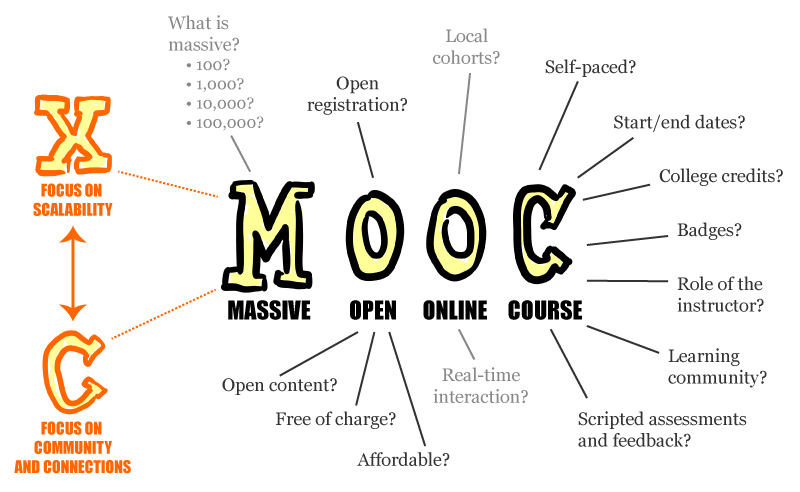 |
| Author: Mathieu Plourde {(Mathplourde on Flickr) |
This will be my first time participating in a MOOC, and I'm excited that it is being offered through my local community college, Leeward Community College!
The first activity of this MOOC is to introduce yourself to the community, so here it goes!
1. What is your intention for this course (why are you here)?
My intention for participating in this course is first to get an idea of how a MOOC works. I've heard of MOOCs in the past and have heard about some great MOOCs that have been offered. If you check out Mooc-List.com, there are some great MOOCs being offered all the time, for many different categories and professions. My other intention, of course, is to become more familiar with the concept of Online Teaching and the tools available for being an online teacher.
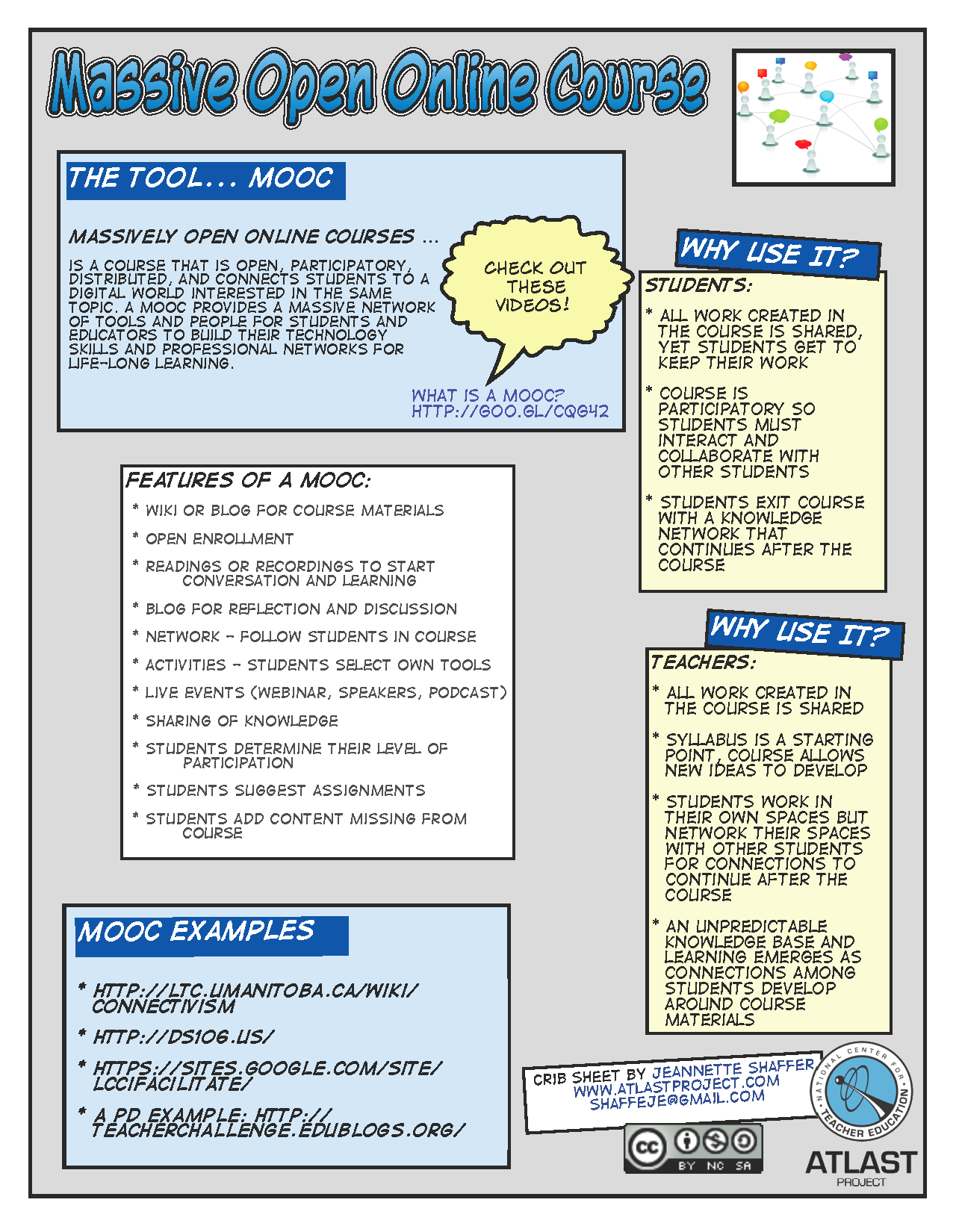 |
| MOOC Crib Sheet created by Jeannette Shaffer (for a 2011 ISTE Workshop) |
I think, first and foremost, we need to have an open mind about Online Teaching. Many universities now offer degrees online, but we are still slowly venturing into the world of online teaching/learning with younger students, especially in elementary and middle school. There are two sides to the concept of online teaching for younger students, but I feel there are many benefits to this option.
3. How will you contribute?
I feel it is extremely important for anyone to be an active participant and a community contribute in their Professional Learning Network and in any MOOC. Because a MOOC is free and typically doesn't offer any sort of credit, most people that choose to participate are there because they want to gain new knowledge and meet new people in their profession. To get the most of your PLN or MOOC, you have to be active and you have to contribute. You won't get much out of the experience or if you are a lurker.
4. How would you like to see the community develop among participants?
I want to see deep, rich conversations about the topics of this MOOC. Only through these conversations, will this MOOC be successful and participants come out of it with a deeper understanding and plethora of resources for Teaching Online.
5. How will you overcome the fear of learning in the open and the frustration of using new technology?
I find it amazing that 90% of the people that register for a MOOC, usually don't even participate. For me, learning and gaining a better understanding of my profession is a passion and a driving force. We have to be more comfortable with new technologies, because they are constantly arriving almost on a daily basis.
It's not too late to register for the How to Teach Online MOOC yourself!
Friday, March 22, 2013
Observing a 1:1 School
Today, I had the privilege of observing 7th grade classes that participate in a 1:1 laptop program. I sat in on four periods, Science, Math, Social Studies, and Language Arts, during the school day at the University Laboratory School, a public charter school in Hawaii.
Each student in the 7th grade is given a Chromebook and a school issued Google Apps for Education account.
A teacher at my school initiated this observation in part because our school has been told that we will likely participate in a 1:1 laptop program sometime next school year, as some part of a Race to the Top Common Core Technology Initiative. About all the information we've received so far comes from a local newspaper article, Hawaii joins laptops-in-schools talks (if you can't view that link, the article can also be found at NPR, Main School Laptop Contract To Be Open to Others).
I made the following observations during my visit today:
1. GAFE (Google Apps for Education) is deeply integrated into almost everything the students do during class.
2. Most classes took full advantage of the 1:1 program by going completely paperless. However, a few classes where about 50/50. I found this perplexing, because in one instance a teacher would have the students take a quiz in Google Drive, and then they would pull out their composition books and start writing down notes. I suppose this has to do with the level of comfort that teacher has with GAFE. But why note keep those notes in Google Drive?
3. Work stored in Google Drive becomes an archive and a Portfolio. In a math class I observed, the teacher used one Google Slide for all the math problems the class worked on since the beginning of the semester. The file was shared with every student in the class so that everyone had access to all of the work and all of the notes generated during class. This creates a running record of the learning going on in class and shows how the math they are learning scaffolds through the semester.
4. Parents need to be stakeholders in this initiative. There needs to be some sort of buy-in from parents so that they are comfortable with their child's increased access to technology and the internet both in school and at home. The University Lab School approaches this buy-in by conducting the following:
Each student in the 7th grade is given a Chromebook and a school issued Google Apps for Education account.
A teacher at my school initiated this observation in part because our school has been told that we will likely participate in a 1:1 laptop program sometime next school year, as some part of a Race to the Top Common Core Technology Initiative. About all the information we've received so far comes from a local newspaper article, Hawaii joins laptops-in-schools talks (if you can't view that link, the article can also be found at NPR, Main School Laptop Contract To Be Open to Others).
I made the following observations during my visit today:
1. GAFE (Google Apps for Education) is deeply integrated into almost everything the students do during class.
- Teachers use Google Drive to display and archive the daily agenda.
- During a math class, students shared a Google Slide to work on daily math problems, with students working in groups, and groups were assigned to one slide that they were responsible for filling in with their observations, questions, solutions, and diagrams.
- In a language arts class, students worked in groups of four and were wrapping up a Google Site full of student generated book reviews and novel excerpts. The students even created their own artwork with photo apps and Google Draw to match their reviews and excerpts.
- In a Science class, student took a quiz by creating a chart in Google Draw. They then added it to a shared folder with the teacher.
- In Social Studies, students created their own Google Slide presentation and a handful of students presented a current event they found in the news a few days prior. The rest of the class took notes on the current event in their own Google document, likely shared with the teacher for record keeping. They also created their own Inca Quipus using Google Draw and then turned it into somewhat of a game. They shared their game with another student in class through Google Drive.
3. Work stored in Google Drive becomes an archive and a Portfolio. In a math class I observed, the teacher used one Google Slide for all the math problems the class worked on since the beginning of the semester. The file was shared with every student in the class so that everyone had access to all of the work and all of the notes generated during class. This creates a running record of the learning going on in class and shows how the math they are learning scaffolds through the semester.
4. Parents need to be stakeholders in this initiative. There needs to be some sort of buy-in from parents so that they are comfortable with their child's increased access to technology and the internet both in school and at home. The University Lab School approaches this buy-in by conducting the following:
- Students are given an extensive AUP and are also required to pass an AUP test before given a laptop. I think the idea of an AUP test is great! It tells the student and the parent, "This document is important!"
- All students go through extensive cyber-bullying and internet safety training/workshops.
- Parents also receive workshops on cyber-bullying and internet safety conducted during Parent Nights.
- Students create safety videos in school and then upload them to Youtube and share them with their families. I love this idea! It allows the students to be creative. It reinforces the training they receive and the purpose of the AUP. And they have an authentic audience.
5. Teachers need Professional Development before they receive the technology! I find this part so extremely important, as do the teachers and leaders at the University Lab School. And frankly, this scares me the most with our own 1:1 laptop program. You can't just give a class technology and expect them to understand it. Well, maybe you can with the students. But not the teachers! I think the approach that this school takes with PD is a great model. Teachers received one full year of PD. Teachers also became the leaders of their own PD and each teacher was required to learn a skill and then provide at least one workshop to their peers. Learning Communities were also set up, and based on the social structure of the school, "Pillars of the Community" were selected to provide the tech support within the school. I see a "Pillar of the Community" as an expert of sorts; someone that the rest of the grade level, or building, can go to for help.
Seeing a 1:1 program in action is exciting! And seeing GAFE integrated into that program is even more exciting! The process isn't easy, but once a school is organized and the students and teachers have received proper professional development and training, the possibilities are endless!
Has your school initiated a 1:1 program? What benefits have you found with you and your students? What pitfalls have you run into and how did you resolve them? Leave a comment below and join the discussion!
Tuesday, August 07, 2012
August is Connected Educator Month!
I'm catching up on this a little late, but better late than never!
I received an email at the end of June from The Global Education Conference Network, announcing August as Connected Educator Month. According to the Connected Educator Month website,
"Online communities and learning networks are helping hundreds of thousands of educators learn, reducing isolation and providing “just in time” access to knowledge and opportunities for collaboration. However, many educators are not yet participating and others aren’t realizing the full benefits. In many cases, schools, districts, and states also are not recognizing and rewarding this essential professional learning.
For these reasons, the U.S. Department of Education’s Connected Educators initiative is launching Connected Educator Month in August 2012. Throughout August, there will be coordinated opportunities to participate in events and activities in dozens of online locations to develop skills and enhance one’s personal learning network."
This is a great idea and I hope that it grows every year! I can testify that using social media and online networks is great for your PLN (Professional Learning Network). Most of the information I share through my social networks came from somewhere else and they are things that I found very interesting and helpful. I feel that PLN's are most often more helpful than the traditional in-school professional learning opportunities because it's learning on my time and geared towards my interests.
Connected Educator Month includes a wide variety of events and activities on a daily basis throughout the month of August, and even reaching through October and November. A calendar of events and activities can be found at: http://connectededucators.org/cem/ If you create an account and log in, you can sync your favorite events to your personal calendar and/or phone.
I received an email at the end of June from The Global Education Conference Network, announcing August as Connected Educator Month. According to the Connected Educator Month website,
"Online communities and learning networks are helping hundreds of thousands of educators learn, reducing isolation and providing “just in time” access to knowledge and opportunities for collaboration. However, many educators are not yet participating and others aren’t realizing the full benefits. In many cases, schools, districts, and states also are not recognizing and rewarding this essential professional learning.
For these reasons, the U.S. Department of Education’s Connected Educators initiative is launching Connected Educator Month in August 2012. Throughout August, there will be coordinated opportunities to participate in events and activities in dozens of online locations to develop skills and enhance one’s personal learning network."
This is a great idea and I hope that it grows every year! I can testify that using social media and online networks is great for your PLN (Professional Learning Network). Most of the information I share through my social networks came from somewhere else and they are things that I found very interesting and helpful. I feel that PLN's are most often more helpful than the traditional in-school professional learning opportunities because it's learning on my time and geared towards my interests.
Connected Educator Month includes a wide variety of events and activities on a daily basis throughout the month of August, and even reaching through October and November. A calendar of events and activities can be found at: http://connectededucators.org/cem/ If you create an account and log in, you can sync your favorite events to your personal calendar and/or phone.
Tuesday, July 10, 2012
Eno Click IWB Support Group Series (Post #2)
This is post #2 of a series of posts that I will be publishing
involving a new support group that I've started at my school. I call it
the "Eno Click IWB Support Group." It involves a group of
teachers at my school that have recently received an interactive
whiteboard (or IWB for short) as well as a "media cart" (which I will
get into a little later). These teachers range from young, new, and willing to experiment with new technology, experienced, and hesitant to try new technology,
but what I love about them all is that they aren't afraid to try
something new! Many teachers may see this as "just one more thing on
their plate" but what many fail to realize is the convenience it adds to
the classroom and the engagement it brings for students.
Post #1: http://technocation.blogspot.com/2012/04/eno-click-iwb-support-group-series-post.html
Post #1: http://technocation.blogspot.com/2012/04/eno-click-iwb-support-group-series-post.html
POST #2
Before I began the support group I wanted to create a list of resources that the teachers could use once they became familiar with their IWB. I scoured the web for both software and web-based applications that can be used on an IWB and with students. Here is a Google document that I created that contains a list of resources with their respective links.
To view the document please click on the link: IWB Resources by Technocation
I shared a version of this Google Doc with my support group and gave them each permission to view and edit the document. I asked them to add any resources that they may find while using their IWB. That way, if anything new is found, every teacher in the group will have access to that information quickly and conveniently.
If you know if any resources that can be used with an IWB please feel free to share in the comments below.
I shared a version of this Google Doc with my support group and gave them each permission to view and edit the document. I asked them to add any resources that they may find while using their IWB. That way, if anything new is found, every teacher in the group will have access to that information quickly and conveniently.
If you know if any resources that can be used with an IWB please feel free to share in the comments below.
Subscribe to:
Posts
(
Atom
)